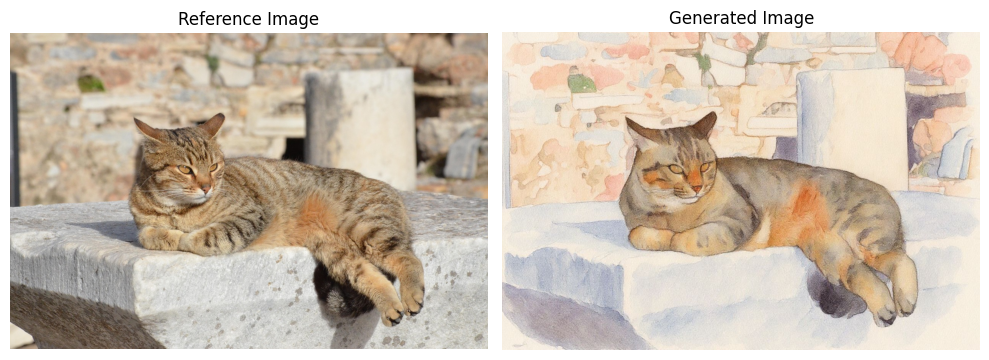
Some image models support editing or transforming an existing image. The parameter you use depends on the model:
ParameterTypeModelsDescription
image_urlstringFLUX.1 Kontext (pro/max), FLUX.2 (pro/flex)A single image URL to edit or transform
reference_imagesstring[]FLUX.2 (pro/dev/flex), Gemini 3 Pro Image, Flash Image 2.5An array of image URLs to guide generation
reference_images is recommended for FLUX.2 and Google models because it supports multiple input images. FLUX.2 [pro] and [flex] also accept image_url for single-image edits, but FLUX.2 [dev], Gemini 3 Pro Image, and Flash Image 2.5 only support reference_images.

Use image_url (Kontext models)

from together import Together

client = Together()

response = client.images.generate(
    model="black-forest-labs/FLUX.1-kontext-pro",
    width=1024,
    height=768,
    prompt="Transform this into a watercolor painting",
    image_url="https://cdn.pixabay.com/photo/2020/05/20/08/27/cat-5195431_1280.jpg",
)
import Together from "together-ai";

const together = new Together();

const response = await together.images.generate({
  model: "black-forest-labs/FLUX.1-kontext-pro",
  width: 1024,
  height: 768,
  prompt: "Transform this into a watercolor painting",
  image_url:
    "https://cdn.pixabay.com/photo/2020/05/20/08/27/cat-5195431_1280.jpg",
});
curl -X POST "https://api.together.ai/v1/images/generations" \
     -H "Authorization: Bearer $TOGETHER_API_KEY" \
     -H "Content-Type: application/json" \
     -d '{
       "model": "black-forest-labs/FLUX.1-kontext-pro",
       "width": 1024,
       "height": 768,
       "prompt": "Transform this into a watercolor painting",
       "image_url": "https://cdn.pixabay.com/photo/2020/05/20/08/27/cat-5195431_1280.jpg"
     }'
Example output: Reference image: reference_image.png

Use reference_images (FLUX.2 and Google models)

from together import Together

client = Together()

response = client.images.generate(
    model="black-forest-labs/FLUX.2-pro",
    width=1024,
    height=768,
    prompt="Replace the color of the car to blue",
    reference_images=[
        "https://images.pexels.com/photos/3729464/pexels-photo-3729464.jpeg"
    ],
)
import Together from "together-ai";

const together = new Together();

const response = await together.images.generate({
  model: "black-forest-labs/FLUX.2-pro",
  width: 1024,
  height: 768,
  prompt: "Replace the color of the car to blue",
  reference_images: [
    "https://images.pexels.com/photos/3729464/pexels-photo-3729464.jpeg",
  ],
});
curl -X POST "https://api.together.ai/v1/images/generations" \
     -H "Authorization: Bearer $TOGETHER_API_KEY" \
     -H "Content-Type: application/json" \
     -d '{
       "model": "black-forest-labs/FLUX.2-pro",
       "width": 1024,
       "height": 768,
       "prompt": "Replace the color of the car to blue",
       "reference_images": ["https://images.pexels.com/photos/3729464/pexels-photo-3729464.jpeg"]
     }'
For more details on multi-image editing, image indexing, and color control with FLUX.2, see the FLUX.2 Quickstart.